 DrivePath
What "DMV-ready" actually means
When you apply for your license, most states ask you (and a parent or guardian) to certify that you completed the required supervised hours. Depending on the state, that means an official state form, a log sheet from the DMV website, or any legible log showing dates, durations, supervisors, and day/night breakdown, signed by the certifying adult.
A DMV-ready log therefore needs:
- Per-drive rows — date, duration, supervisor, conditions
- Totals — overall hours and night hours, matched against your state's requirement
- Signature lines — parent/guardian and driver certification
- Legibility — no coffee-stained glovebox sheet with 40 rows of pencil
Exporting your driving log from DrivePath
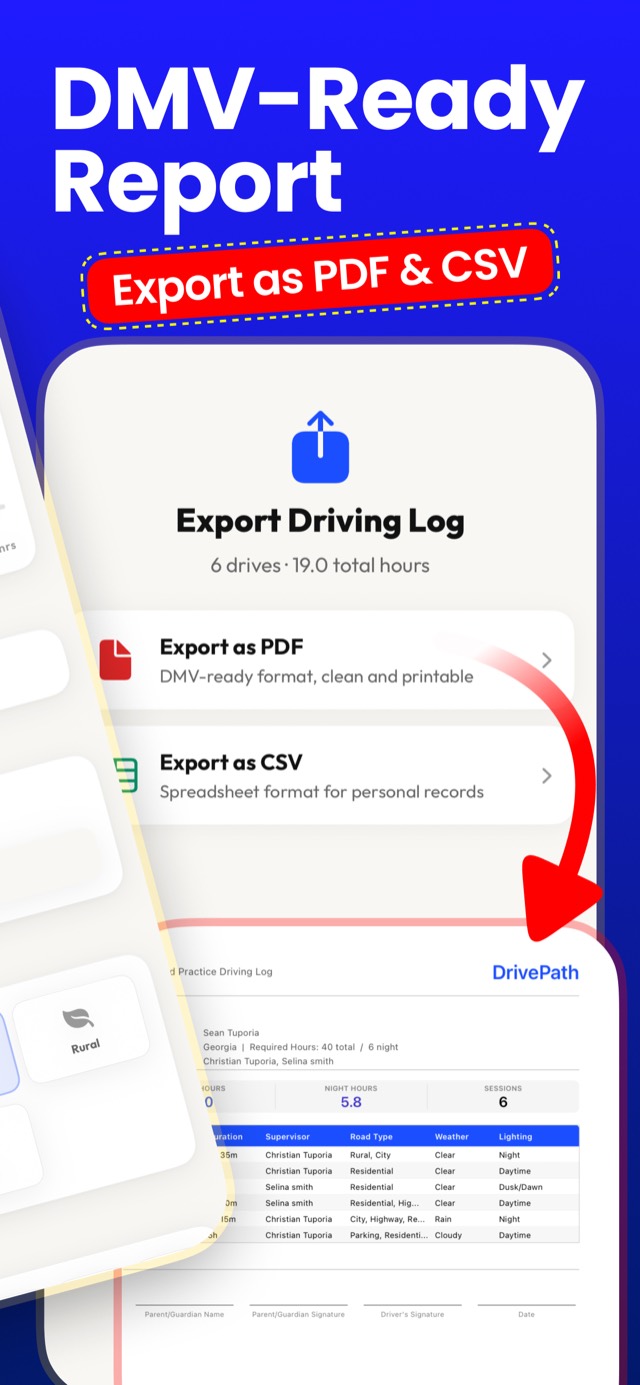
- Open Export Driving Log. You'll see your log summary — e.g. "6 drives · 19.0 total hours."
- Choose Export as PDF for the DMV-ready format: a clean, printable document with your name, state, required hours, per-drive table (date, duration, supervisor, road type, weather, lighting), totals, and signature lines at the bottom.
- Or choose Export as CSV — a spreadsheet of every drive for your personal records, your driving school, or transfer to any other tool.
- Print or share. AirPrint it, email it to a parent for review, or save it to Files. Get it signed, and bring it to your road test appointment.
PDF and CSV export (plus import) are part of DrivePath Premium, purchased securely through Apple — logging and tracking are free.
Moving old logs in, not just out
Already have hours in a spreadsheet, a paper sheet you typed up, or an app you're leaving? DrivePath imports CSV and PDF logs, merges them into your history, and counts them toward your state requirement — so switching tools never costs you logged hours. Coming from RoadReady specifically? Here's the migration guide →
Show up to the DMV ready.
Log free, then export a clean, signed, DMV-ready PDF when your hours are done.
Download DrivePath Free