 DrivePath
Quick answer: You'll be the one certifying — usually signing — that your teen completed their state's supervised hours, so the log is really your responsibility. Track every drive as it happens (date, duration, who supervised, day or night, conditions), keep night hours on pace, and use an app like DrivePath that supports multiple drivers and exports a signable, DMV-ready PDF.
Your role: supervisor and certifier
Every state's graduated licensing program leans on parents twice. During the permit phase, you're the licensed adult in the passenger seat for 30–70 hours of practice. At the end, you sign a certification that the logged hours are true. That signature is why guessing ("it's probably been about 50 hours…") is a bad idea — you want a real record, built drive by drive.
What to log on every supervised drive
- Date and duration — the DMV's core requirement
- Supervisor — you, your spouse, an instructor; per-drive names make the log credible
- Day or night — most states require 10–15 night hours tracked separately (night hours explained)
- Road type and weather — residential, city, highway, rain, fog — so you can see what your teen hasn't practiced yet
- Notes — "first highway merge, handled it well" — gold for tracking real progress, and DrivePath keeps notes per drive
Running the log in DrivePath
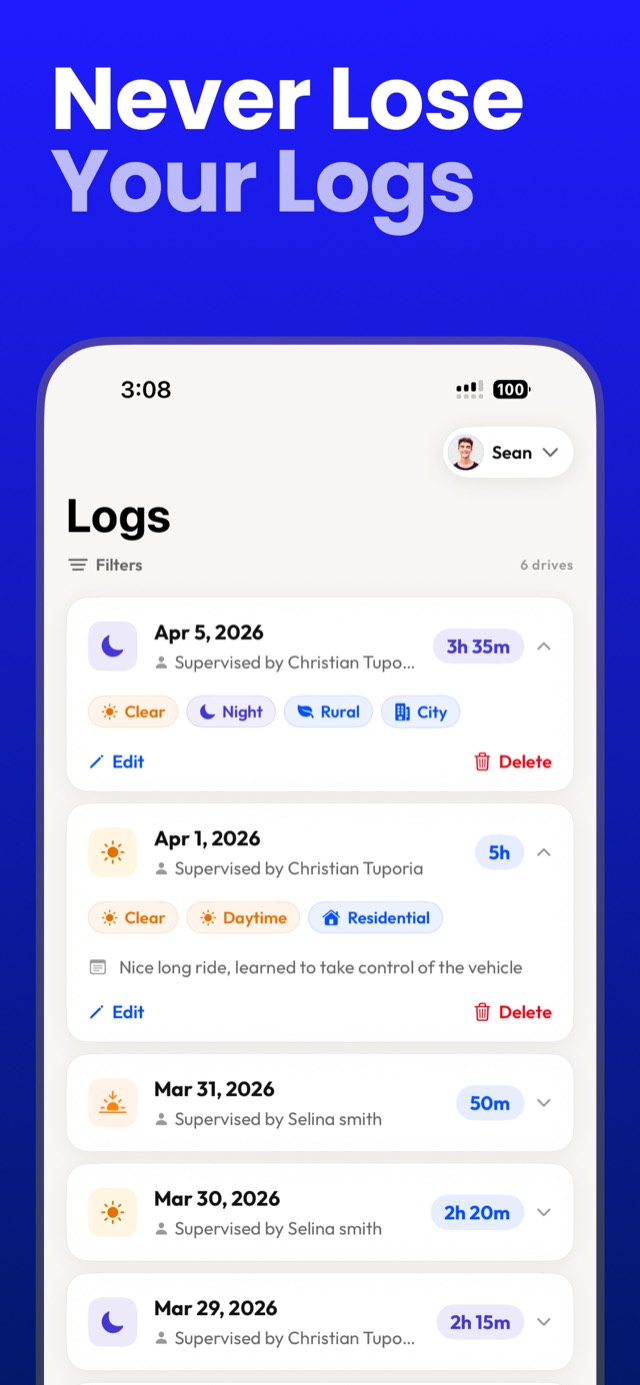
- Set the state once. DrivePath loads your state's exact total and night-hour requirements and tracks both on progress bars — you always know how far from done you are.
- Start the live timer at the driveway. The session runs on the phone's lock screen with pause and end controls, so you can manage it from the passenger seat while your teen keeps both hands on the wheel.
- Tag the drive in ten seconds. Supervisor, road type, weather, lighting, optional note. Done while you're still parked.
- Review condition gaps monthly. The dashboard flags unpracticed conditions — no rain drives, no highway time — so you can plan practice deliberately instead of discovering gaps at hour 49.
- Export and sign. When the bars fill, export the DMV-ready PDF; it has signature lines for you and your teen.
More than one teen? One app.
DrivePath supports unlimited drivers — each with their own state requirement, log, progress bars, and export. Two kids fifteen months apart both on permits, a blended family with three learners, or a driving instructor's whole roster: every driver's hours stay separate and every log exports individually.
Tracking hours ≠ surveillance. Apps like OtoZen or Life360 monitor location and driving behavior. DrivePath does one job instead: it's the official practice log — the document the DMV wants — without putting a tracker on your kid. There's no GPS and no location data at all (see the privacy policy). If all you need is hours, conditions, and a signable PDF, you don't need the surveillance suite.
Making the hours count (not just count up)
- Frequent beats long: four 45-minute drives teach more than one 3-hour slog.
- Escalate deliberately: parking lots → residential → city → highway → night → bad weather.
- Narrate early, quiet later: coach actively in the first 10 hours, then progressively shut up — the road test is silent.
- Use the log as the conversation: reviewing the week's drives and gaps together turns "did we do enough?" into a plan.
The log you'll actually sign with confidence.
Every drive, every driver, every requirement — tracked in one free app.
Download DrivePath Free