The best driving log apps for teens in 2026, compared
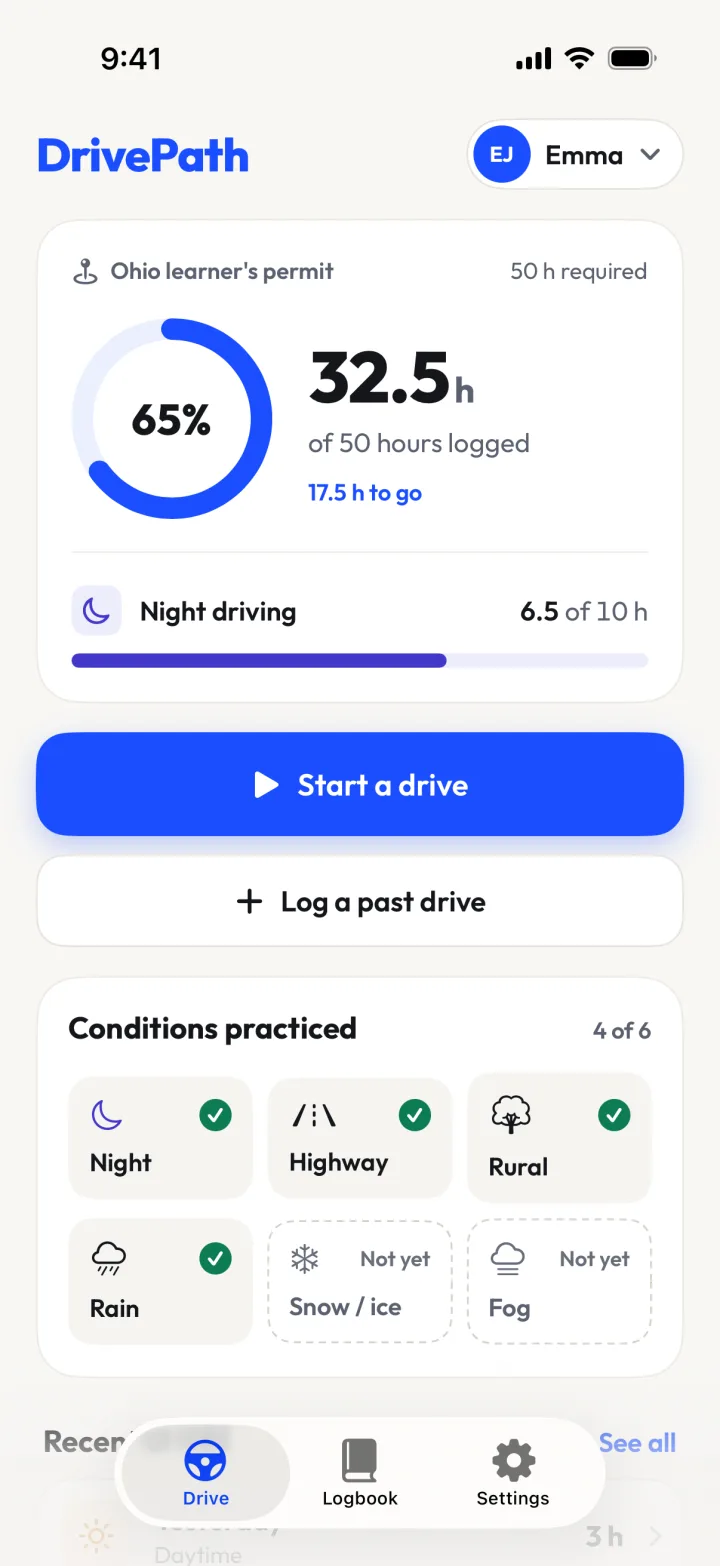
DrivePath is our pick for most families. It times every drive from the lock screen, tracks progress against your state's total and night-hour targets, and asks for no account, no ads and no location. Logging is free, and Premium adds the PDF and CSV export for the DMV.
We make DrivePath, so we compared the other six on facts alone. Every claim below comes from each app's own App Store page, Google Play listing or website, checked on November 18, 2026, and links back to it.
Our pick.
The app we'd hand any family starting a permit, and what you give up with each of the others.
Best overall · Best for privacy
DrivePathOur app
- No account, no ads and no location tracking. Its App Store privacy label says “Data Not Collected.”
- Your state's total and night-hour targets built in, with progress after every drive.
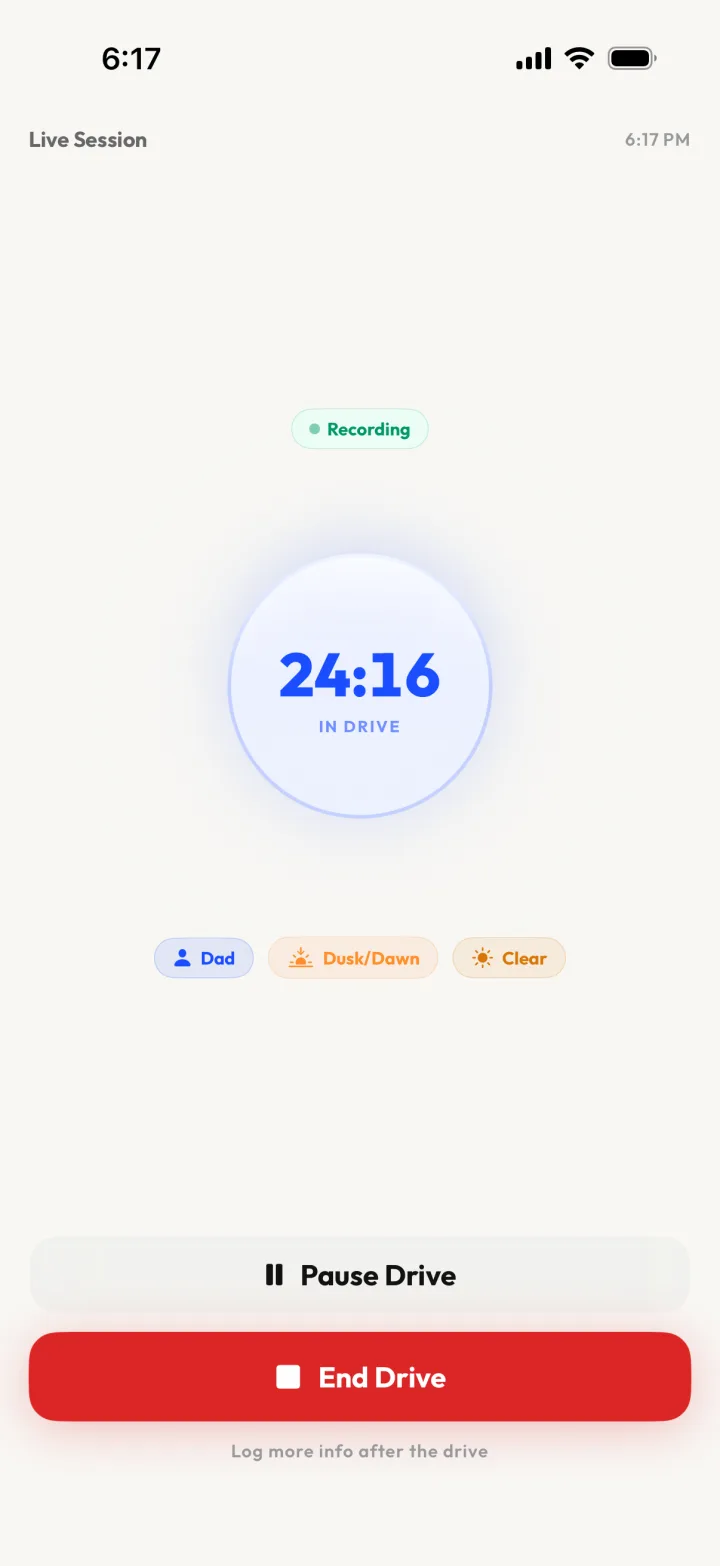
- A lock-screen timer with pause and end, so the supervisor runs the drive without unlocking the phone.
- Free to log every drive and to import an old log. Premium adds PDF and CSV export and more drivers.

How the others compare
- GoTimeFree PDF export, but the parent needs an account, and location and contact info are linked to you.
- RoadReadyFree, but with ads, two accounts and GPS running in the background.
- DMV Driving Hours LogThe free plan stops at 2 hours. Pro runs from $2.99 a week to $39.99 lifetime.
- Student Driving LoggerFree with ads, and its privacy label lists data used to track you.
- ClockedFree to log, $4.99 for the PDF, and a sign-in on each phone to sync.
- PermitLogOnly your first drives are free, and it needs iOS 18 or later.
Side by side.
Seven apps, checked against their own App Store pages, Google Play listings and websites on November 18, 2026.
| App | Free version | Paid upgrade | PDF export | Night hours |
|---|---|---|---|---|
| DrivePathOur app | Unlimited logging; import a CSV or PDF log | Premium: $4.99 to $7.99 a month, or $9.99 to $19.99 once | PDF and CSV, with Premium | Day, dusk and night tags you can adjust to your state's rule |
| GoTime | The full log: unlimited drives, drivers and supervisors | Pro: $3.99 a month or $19.99 a year | Free, plus CSV; your state's form with Pro | Local sunset and sunrise |
| RoadReady | Everything, with ads | None | Free: state affidavit and log | Day and night hours tracked |
| DMV Driving Hours Log | The first 2 hours per account | Pro: $2.99 a week up to $39.99 lifetime | Yes, in every state | Local sunrise and sunset, with location on |
| Student Driving Logger | Logging and PDF export, with ads | Remove ads: $3.99 | Free | Not stated |
| Clocked | Unlimited logging and sync | PDF unlock: $4.99 once | $4.99 once | Local sunrise and sunset |
| PermitLog | Your first drives | $4.99 once | Part of the $4.99 unlock | Day and night drives |
| App | Account | Location | App Store privacy label | Ads |
|---|---|---|---|---|
| DrivePathOur app | None | Not used | Data Not Collected | None |
| GoTime | The parent needs one | GPS during drives only | Linked to you: location, contact info, usage data, purchases and more | Listed as “Contains Advertising”; the app says it has no ad networks |
| RoadReady | Student and supervisor accounts, two-factor sign-in | Background GPS, with driving scores | Not linked to you: usage data, diagnostics | Yes, on the App Store and Google Play |
| DMV Driving Hours Log | Sign-in with an emailed code | Optional GPS during drives | Linked to you: usage data. Not linked: email, location | None |
| Student Driving Logger | Not stated | GPS auto-tracking, with “Always” access | Used to track you: identifiers, usage data | Yes; $3.99 removes them |
| Clocked | Sign in on each phone to sync | Read once per drive, for day or night | Linked to you: purchases, email, user ID, usage data | None |
| PermitLog | None | Not stated | Data Not Collected | None |
Prices are US App Store prices on November 18, 2026. Privacy labels are what each developer reports to Apple, and Apple doesn't verify them. “Not stated” means the app's listing and website don't say.
How we compared
We searched the US App Store for driving log, teen driving log, permit hours and driving hours apps, and kept the ones built to log a teen's supervised practice. Then we read each app's App Store page, its Google Play listing and its developer's website, and wrote down only what they state. Where an app doesn't say, the tables say “Not stated” rather than guess.
We compared what decides whether an app gets your teen to the road test without a fight: what's free, what the export costs, how night hours are counted, and what it collects about your family.
Why there are no star ratings
This comparison leaves out star ratings and review counts for every app. We make one of these apps, ratings change every day, and they say little about whether an app fits your state's paperwork. Each review below links to the app's App Store page, where you can read current reviews.
The seven apps, one by one
Ours comes first. The other six follow, each with its trade-offs.
DrivePathOur app
DrivePath is a timer-based log with your state's total and night-hour targets built in. It asks for no account and never uses location: it records the time, the supervisor and the conditions, and keeps the log on your phone and in your own iCloud.
Why families pick it
- No account, no location tracking and no ads. Its App Store privacy label says “Data Not Collected.”
- A lock-screen timer with pause and end, so the supervisor can run the drive without unlocking the phone.
- The supervisor's name is saved on every drive, so each parent's hours stay clear.
- Shows which conditions, like rain, fog, highway or night, your teen hasn't practiced yet.
Free, and what Premium adds
- Free: unlimited drives, your state's targets, and importing a CSV or PDF log from another app.
- Premium: PDF and CSV export for the DMV, and more drivers for families with more than one teen.
- Monthly from $4.99, or a one-time purchase from $9.99, as listed on the App Store.
GoTime
GoTime, from Weekly LLC, offers a free log: drives timed with GPS, night hours from your local sunset and sunrise, every parent and supervisor on one shared log, and a PDF or CSV export with a signature block. GPS runs only during a drive.
Good
- Free PDF and CSV export, with no limit on drives, drivers or supervisors.
- Night hours follow the real sunset and sunrise for your location and date.
- Imports hours from RoadReady, another app or a paper log.
Watch out
- The supervising parent needs an account, and the App Store privacy label lists location, contact info and usage data as linked to you.
- Your state's official form, filled in from your drives, is a Pro feature in the states that have one.
- The App Store listing carries Apple's “Contains Advertising” label, though GoTime's description says it has no ad networks.
RoadReady
RoadReady, from Safe Roads Alliance, has been on the App Store since 2013 and has no in-app purchases. It times drives with GPS telematics, tracks day and night hours, and produces your state's affidavit and driving log when you're done. Ohio families also have a separate RoadReady Ohio app, designed with the Ohio Traffic Safety Office.
Good
- Free, with the state affidavit and log built in.
- Supervisors can manage several students and see speeding, braking and turning.
Watch out
- Ads: both its App Store and Google Play listings carry ad labels.
- The student and the supervisor each need an account, with two-factor sign-in.
- GPS runs in the background. Its own listing warns that this can drain the battery, and its help asks for location set to “Always Allow.”
RoadReady on the App StoreRoadReady on Google PlaySwitching from RoadReady
DMV Driving Hours Log
DMV Driving Hours Log, from Acrux Studios, loads your state's targets, detects night drives from local sunrise and sunset when location is on, and exports a PDF in every state. In the few states with their own form, the export follows that form.
Good
- A PDF export in every state, laid out like the state's own form where one is required.
- Several teen profiles, and family sharing by invite code.
- GPS is optional: you can time drives with location off.
- No ads.
Watch out
- The free plan stops at 2 hours of recorded practice for the whole account, so you'll need Pro to log a real permit.
- Pro is listed from $2.99 a week to $39.99 for lifetime. Over a nine-month permit, the weekly plan comes to about $117.
- You have to sign in with an emailed code.
Student Driving Logger
Student Driving Logger, by Akash Pulinthanathu, has been on the App Store since 2020. It tracks drives automatically with GPS, records the route and the weather, and exports your drives to a PDF, all for free.
Good
- Free automatic tracking and free PDF export.
- Import and export to move drives between devices.
- A heat map and statistics of where your teen has practiced.
Watch out
- Ads, and an App Store privacy label that lists identifiers and usage data as used to track you across other companies' apps and websites.
- Its release notes ask for “Always” location access for accurate tracking.
- The listing doesn't say whether it counts night hours separately. Instead of built-in state targets, it says you can tailor it to your DMV's guidelines.
Clocked
Clocked, from Gift With Bear, is a simple tap-to-start timer. It reads your location once at the start of a drive to decide day or night from local sunrise and sunset, and keeps no route history.
Good
- Unlimited logging, day and night sorting, and sync between the teen's and the parent's phones, free.
- One payment of $4.99 for the PDF export. No subscription and no ads.
- No continuous GPS and no route history.
Watch out
- You sign in on each phone to sync, and its privacy label lists email, user ID, purchases and usage data as linked to you.
- The PDF is a general log. If your state wants its own form, you copy the numbers over.
PermitLog
PermitLog, from Latitude 360 Advisors, is a timer and manual-entry log. It says it has every state's requirements built in, separates day and night drives, and makes PDF log sheets with columns for the supervisor to sign.
Good
- No account or login, and an App Store privacy label of “Data Not Collected.”
- One payment of $4.99 unlocks unlimited drives, more drivers and PDF exports. No subscription.
- Records weather, road type and the maneuvers practiced.
Watch out
- Only your first drives are free, and the listing doesn't say how many.
- It needs iOS 18 or later, so it won't run on older iPhones.
- The listing doesn't say how it decides whether a drive was at night.
How to choose for your state
The right app depends less on features than on what your state asks you to hand in. Start there.
- Check how your state wants proof. In New York you sign form MV-262, Ohio wants a notarized affidavit (BMV 5791), North Carolina uses its own log (DL-4A), and in Illinois you certify the hours in person. Where a state has its own form, any app's export is the record you copy from. Our hours-by-state guide lists what every state asks for.
- Check when night starts. Iowa, Missouri and Nebraska count night from sunset, Ohio, Michigan and Vermont from 30 minutes after sunset, and Maryland from 30 minutes before it. An app that uses sunset can still be half an hour off for your state, so check the tags. See what counts as night driving.
- Count the whole permit. Ohio and New York make you hold the permit for six months, and Virginia, North Carolina and Illinois for nine. Over nine months, $2.99 a week comes to about $117, $3.99 a month to about $36, and $4.99 a month to about $45. A one-time price is often cheaper, and DrivePath Premium is also sold once, from $9.99.
- Decide who supervises. Most families share the driving between two parents or a parent and another adult. DrivePath saves the supervisor's name on every drive, so the log shows whose hours are whose when it's time to sign.
- Check the official rule. State rules change, so before the road test, compare your app's target with your state's own page. Each of our state guides links to the official source.
Prefer paper?
Plenty of families still keep a paper log in the glovebox, and that's fine. Print our free printable driving log sheet, write down every drive, and add up the hours before the road test. If your state has its own log or form, use that, or copy your totals onto it.
Sources
Everything above comes from these pages, checked on November 18, 2026. Prices are US App Store prices.
- DrivePath: App Store listing and the app itself
- GoTime: App Store listing, Google Play listing, GoTime FAQ
- RoadReady: App Store listing, Google Play listing, RoadReady website, RoadReady Ohio listing
- DMV Driving Hours Log: App Store listing, Google Play listing, support page, privacy policy
- Student Driving Logger: App Store listing, Google Play listing
- Clocked: App Store listing, Clocked website
- PermitLog: App Store listing